
# How to Set Up Your First 3Commas Grid Bot (Complete 2026 Guide)
Introduction
Grid trading bots are one of the most popular ways to automate crypto trading — especially in sideways or ranging markets where prices oscillate within predictable levels.
But if you’re new to automated trading, the setup process can feel overwhelming. How do you connect your exchange? What settings should you use? How much capital do you need?
This complete guide walks you through setting up your first 3Commas grid bot from scratch — with safe beginner settings, screenshots for every step, and realistic expectations about what grid bots can (and cannot) do.
By the end of this guide, you’ll have:
- A working grid bot connected to your exchange
- Safe position sizing and risk controls
- A clear understanding of when grid bots work best
- The ability to monitor and adjust your bot’s performance
Let’s get started.
What Is a Grid Trading Bot? (Quick Recap)
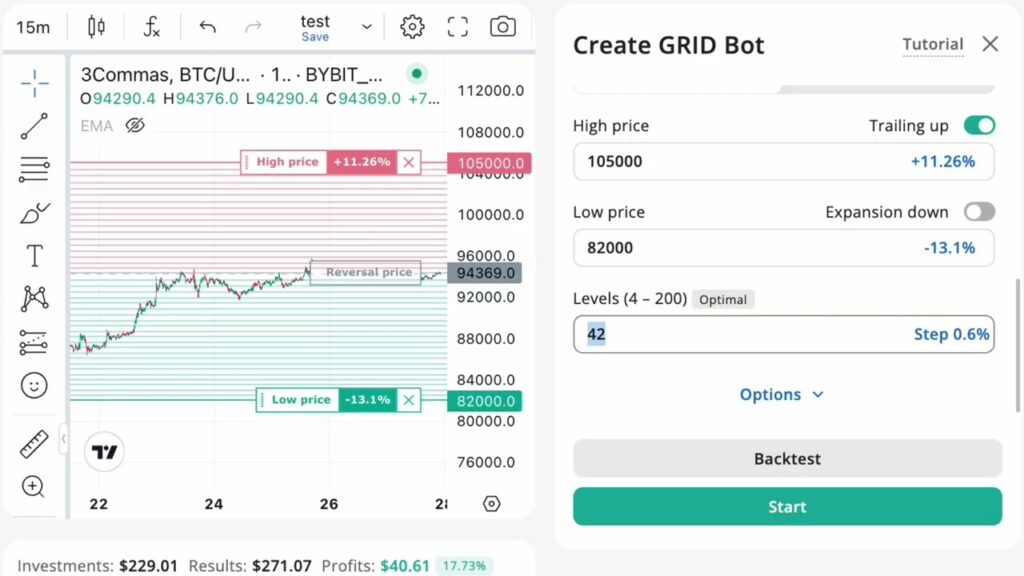
A grid trading bot automates a simple but effective strategy:
- Set a price range (upper and lower bounds)
- Divide that range into multiple “grids” (buy and sell levels)
- The bot buys when price drops to a grid level
- The bot sells when price rises to the next grid level
- Repeat continuously, capturing small profits from price oscillations
Grid bots work best in ranging markets where prices move sideways rather than trending strongly in one direction.
Why 3Commas?
3Commas is one of the most established platforms for crypto trading automation. It supports:
- Grid bots and DCA bots
- Multiple exchanges (Binance, Bybit, KuCoin, etc.)
- Beginner-friendly interface
- Advanced features (trailing, stop-loss, SmartTrade)
It’s not the cheapest option, but it’s reliable and well-documented — ideal for your first bot.
👉 Try 3Commas Free (No Credit Card Required)
Prerequisites: What You Need Before Starting
Before setting up your grid bot, make sure you have:
1. A 3Commas Account
Sign up at 3Commas (link above). You can start with the free trial to test features before committing to a paid plan.
Pricing (2026):
- Starter: ~$20/month (limited bots)
- pro: ~$50/month (Multi account spot, futures trading)
- expert: ~$140/month (exceptional limits, priority support)
Start with the Pro plan if you’re serious about automation — the Starter plan’s bot limits are too restrictive for testing multiple strategies.
2. A Supported Exchange Account
3Commas works with major exchanges. The most popular choices for grid trading:
- Binance (largest liquidity, lowest fees with BNB)
- Bybit (good for futures grid trading)
- KuCoin (wide altcoin selection)
Choose an exchange you’re already familiar with, or create a Binance account if you’re starting fresh.
3. Capital Allocation (Minimum $100–$500)
Grid bots need enough capital to place multiple orders across the grid.
Realistic minimums:
- $100: Very tight grid (limited profit potential)
- $300–$500: Comfortable range for testing
- $1000+: Allows for wider grids and better risk management
Important: Only use capital you can afford to keep locked in the grid for weeks or months. Grid bots are not “get rich quick” — they’re for steady, low-risk accumulation.
4. Basic Understanding of Risk
Grid bots can lose money if:
- Price breaks below your lower grid (unrealized losses pile up)
- You use leverage (amplifies losses)
- You pick a trending market instead of a ranging one
We’ll cover safe settings to minimize these risks.
Step-by-Step: Setting Up Your First 3Commas Grid Bot
Step 1: Connect Your Exchange to 3Commas
Log in to your 3Commas account and navigate to “My Exchanges” in the dashboard.
For Binance:
- Go to Binance → Account → API Management
- Create a new API key with “Enable Spot & Margin Trading” (do NOT enable withdrawals)
- Restrict API access to 3Commas IP addresses (found in 3Commas settings)
- Copy your API Key and Secret Key
- Paste them into 3Commas → Add Exchange → Binance
Security tip: Never enable withdrawal permissions on API keys used for trading bots. This limits damage if your account is compromised.
Screenshot placeholder: [3Commas exchange connection screen]
Step 2: Choose Your Trading Pair
Grid bots work best with:
- High liquidity pairs (BTC/USDT, ETH/USDT, BNB/USDT)
- Ranging or sideways markets (not strong uptrends or downtrends)
- Moderate volatility (enough movement for profits, but not chaotic)
Beginner recommendation: Start with BTC/USDT or ETH/USDT. These pairs have:
- Deep liquidity (low slippage)
- Predictable behavior (less risk of sudden crashes)
- Enough volatility to generate grid profits
Avoid:
- Low-cap altcoins (high risk of rug pulls)
- Meme coins (extreme volatility, unreliable)
- Trending assets during bull/bear runs (grid bots underperform in trends)
Step 3: Set Up Your Grid Parameters
This is the most critical step. Your grid settings determine profitability and risk.
Go to: 3Commas Dashboard → Bots → Create Bot → Grid Bot
You’ll see these settings:
A. Price Range (Upper and Lower Bounds)
Define the price range where your bot will operate.
Example (BTC/USDT at $95,000):
- Lower bound: $85,000 (10% below current price)
- Upper bound: $105,000 (10% above current price)
How to choose:
- Look at recent price history (last 30-60 days)
- Identify support and resistance levels
- Set bounds slightly outside typical range (avoid grid exhaustion)
Conservative approach: Use narrower ranges (5-10% each side) to reduce capital risk.
Screenshot placeholder: [Grid bot parameter settings screen]
B. Number of Grids
This determines how many buy/sell levels your bot will create within the range.
Typical settings:
- 10-20 grids: Wide spacing (larger profits per trade, fewer trades)
- 30-50 grids: Tight spacing (smaller profits per trade, more trades)
- 100+ grids: Very tight (advanced users, higher fees)
Beginner recommendation: Start with 20-30 grids.
This balances:
- Enough grids to capture small price moves
- Not so many that trading fees eat profits
C. Investment Amount
How much capital to allocate to this grid bot.
Example:
- Total capital: $500
- Allocation to this bot: $300 (60%)
- Keep $200 in reserve for other strategies
Risk rule: Never allocate 100% of your capital to one bot. Diversify across multiple bots or keep reserves for manual trading.
D. Grid Type (Arithmetic vs Geometric)
- Arithmetic: Equal price spacing between grids
- Geometric: Equal percentage spacing (better for volatile assets)
Beginner recommendation: Use Arithmetic for stablecoins and major pairs. Switch to Geometric for high-volatility altcoins.
E. Leverage (Optional — Not Recommended for Beginners)
3Commas allows leverage on grid bots (2x, 3x, 5x, etc.).
Our strong recommendation: Do NOT use leverage when starting.
Leverage:
- Amplifies gains (if price stays in range)
- Amplifies losses (if price breaks below grid)
- Increases liquidation risk
Start with 1x (no leverage) until you’ve run profitable bots for 3-6 months.
Step 4: Configure Safety Settings
3Commas offers optional safety features:
Stop-Loss
Set a stop-loss percentage to automatically close the bot if losses exceed a threshold.
Example:
- Stop-loss: -10%
If your bot’s unrealized loss hits 10%, it will close all positions and stop.
Recommendation: Use a 5-10% stop-loss for your first bot. This prevents catastrophic losses if the market crashes.
Take-Profit (Optional)
Close the bot automatically if total profit reaches a target.
Example:
- Take-profit: +15%
The bot will stop once it’s made 15% profit.
Our take: Skip take-profit for now. Let the bot run continuously — grid bots are designed for long-term accumulation, not quick exits.
Step 5: Review and Launch
Before you hit “Start Bot,” double-check:
- ✅ Exchange API connected correctly
- ✅ Trading pair selected (e.g., BTC/USDT)
- ✅ Price range matches current market (not too wide or too narrow)
- ✅ Number of grids: 20-30
- ✅ Investment amount: Only what you can afford to lock up
- ✅ Leverage: 1x (no leverage)
- ✅ Stop-loss: 5-10%
Screenshot placeholder: [Bot summary before launch]
Once everything looks good, click “Start Bot”.
Your grid bot is now live.
Step 6: Monitor Your Bot’s Performance
Don’t set it and forget it — especially in the first week.
What to check daily:
1. Profit/Loss
3Commas shows:
- Realized profit: Actual profit from closed grid trades
- Unrealized P&L: Paper profit/loss from open positions
Early on, you’ll likely see unrealized losses as the bot buys into dips. This is normal — grid bots accumulate positions and profit when price bounces back.
2. Grid Coverage
Is the price staying within your grid range?
- Yes: Great. The bot is working as intended.
- No (price above upper bound): The bot has sold everything and is waiting for a dip. Consider widening the range or taking profit.
- No (price below lower bound): The bot is fully invested and underwater. Monitor closely — this is when stop-loss protection matters.
3. Trading Frequency
Check how often the bot is executing trades.
- Too many trades: Fees might be eating profits. Consider fewer grids.
- Too few trades: The grid might be too wide. Tighten the range or increase grids.
Common Mistakes to Avoid
1. Setting Grids Too Wide
If your price range is too large (e.g., $70k-$120k for BTC), the bot will:
- Spread capital too thin
- Make very few trades
- Miss profit opportunities
Fix: Use historical price data to set realistic bounds (typically ±10-15% from current price).
2. Using Leverage on Your First Bot
Leverage = faster losses.
Fix: Start with 1x leverage. Only add leverage after 3-6 months of profitable trading.
3. Picking Trending Markets
Grid bots lose money in strong trends (up or down).
Fix: Use grid bots in sideways/ranging markets. For trending markets, use DCA bots instead.
4. Ignoring Fees
Trading fees (typically 0.1% per trade) add up fast with grid bots.
Fix:
- Use Binance with BNB for fee discounts (0.075%)
- Reduce number of grids if fees are eating profits
- Track net profit (after fees) in 3Commas
5. No Stop-Loss
Without a stop-loss, a market crash can wipe out months of profits.
Fix: Always set a 5-10% stop-loss on beginner bots.
When to Stop or Adjust Your Bot
Stop the bot if:
- Price breaks significantly below your grid (and keeps dropping)
- Unrealized losses exceed your risk tolerance (even with stop-loss)
- Market enters a strong downtrend (grid bots underperform in bear markets)
Adjust settings if:
- Price consistently hits upper/lower bounds (widen the range)
- Too many/too few trades (adjust number of grids)
- Profit is lower than expected (analyze fee impact, volatility)
Realistic Profit Expectations
What can you actually make with a grid bot?
Grid bots are not get-rich-quick tools. They’re designed for:
- Steady, low-risk accumulation (think 0.5-2% profit per week in good conditions)
- Passive income (automated, no manual trading)
- Capital efficiency (compounding small wins over time)
Example scenario (conservative):
- Capital: $500
- Monthly profit: 3-5% ($15-$25)
- Annualized: 36-60% ROI
That’s excellent for a low-effort, automated strategy — but it’s not “quit your job” money unless you scale significantly.
Next Steps: Scaling and Optimization
Once your first grid bot is profitable for 30+ days:
1. Add More Bots
Diversify across:
- Multiple pairs (BTC/USDT, ETH/USDT, BNB/USDT)
- Different exchanges (reduce platform risk)
- Different strategies (grid + DCA combo)
2. Optimize Grid Settings
Backtest different configurations:
- Wider vs narrower ranges
- More vs fewer grids
- Arithmetic vs geometric spacing
3Commas offers backtesting tools to simulate performance without risking real capital.
3. Learn Advanced Features
Explore:
- Trailing grids (adjust range automatically)
- SmartTrade (manual grid control)
- Futures grid bots (leverage with caution)
Conclusion
Setting up your first 3Commas grid bot doesn’t have to be complicated.
Follow this step-by-step guide:
- Connect your exchange (Binance recommended)
- Choose a high-liquidity pair (BTC/USDT or ETH/USDT)
- Set safe grid parameters (20-30 grids, ±10% range, 1x leverage)
- Enable stop-loss protection (5-10%)
- Monitor daily for the first week
- Adjust based on performance
Remember:
- Grid bots are for ranging markets (not strong trends)
- Start small ($300-$500)
- Never use leverage until you’ve proven profitability
- Track fees — they eat into profits
If you follow these principles, grid bots can be a reliable tool for passive crypto income.
👉 Get Started with 3Commas (Free Trial)
FAQ
Q: How much money do I need to start a 3Commas grid bot?
A: Minimum $100, but $300-$500 is recommended for better grid coverage and lower risk.
Q: Can I lose money with grid bots?
A: Yes. If the price drops below your grid and doesn’t recover, you’ll have unrealized losses. Always use a stop-loss.
Q: What’s the best trading pair for beginners?
A: BTC/USDT or ETH/USDT. High liquidity, lower risk than altcoins.
Q: Should I use leverage on my first bot?
A: No. Start with 1x leverage (no leverage) until you’re consistently profitable.
Q: How long should I run a grid bot?
A: At least 30-60 days to evaluate performance through different market conditions.
Q: Can I run multiple grid bots at the same time?
A: Yes, but start with one bot first. Once it’s profitable, scale to 2-3 bots on different pairs.
Related Articles:
- Grid Trading Bot Strategies for Different Market Phases
- Best Grid Trading Bots for Beginners (2026 Guide)
- 3Commas vs GoodCrypto: Which Bot Is Better?
- Is Automated Crypto Trading Worth It in 2026?
Disclaimer: This article contains affiliate links. We may earn a commission if you sign up through our links, at no extra cost to you. We only recommend tools we genuinely believe are useful. See our Affiliate Disclosure for full transparency.